Convert Time: Solving Timezone Confusion
How I built Convert Time — a Chrome extension that converts any time to your timezone on hover. 400+ timezone support with automatic DST.
Key Metrics
| Metric | Value |
|---|---|
| Installs | 128 |
| Timezones Supported | 400+ |
| User Action Required | 1 hover |
| Time Saved | ∞ |
The Problem
I’ve been digital nomading through Southeast Asia and constantly tripping over timezone math. Every call, every deadline, every “let’s sync at 3pm” — which 3pm? Mine or yours? And it turns out the world doesn’t just have 24 timezones. There are over 400 when you factor in half-hour offsets, DST variations, and regional quirks. With remote work now the norm, this affects everyone from sales teams booking demos to recruiters scheduling interviews.
I got sick of alt-tabbing to Google “what time is 2pm PST in GMT+7” five times a day.
The Solution
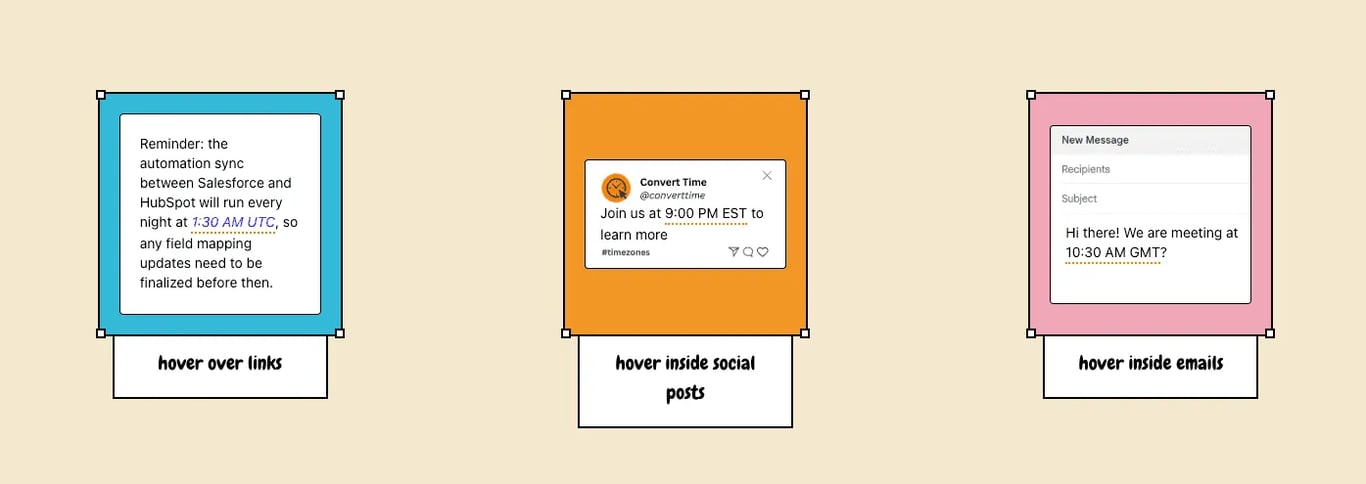
Convert Time is a Chrome extension that does one thing: it finds times on whatever webpage you’re looking at and tells you what they are in your timezone. Hover over a detected time, get a tooltip, done.
Key Features
- Automatic detection - picks up formats like “2 PM PST”, “14:00 CET”, “5:30pm (GMT+7)”, and ISO datetime strings, then underlines them inline
- Hover-to-convert - one hover gives you the conversion in a tooltip, no clicks needed
- Zero data collection - runs entirely in the browser, nothing leaves your machine
Technical Challenges
Timezone Parsing
I genuinely didn’t realise there were so many timezones. Building the parser to catch all the different ways people write times - “2pm EST”, “14:00 CET”, “5:30 PM Pacific”, “2025-08-07 08:02:46 GMT+0000” - without false positives on random numbers was a proper challenge. I built this with Claude and got a massive amount done super quickly, but it’s been an ongoing process of refinement.
The Edge Cases Keep Coming
I dogfood this extension daily, which means I keep finding things to fix. Some highlights from the changelog:
- EST vs EDT ambiguity - Americans say “EST” when they sometimes mean “EDT”, so I had to treat it as a double timezone showing both UTC-5 and UTC-4 conversions unless explicitly stated
- False positives everywhere -
+8 UTCwas incorrectly matching8 UTC.5 with officewas matching5 wit. Had to add word boundary checks and context validation - Editable text areas - The extension was interfering with text inputs and X/Threads post drafting. Had to add filtering to respect user input areas
- GMT+N offset parsing -
1:00 AM (GMT+7)was being parsed asGMT+0because the regex wasn’t capturing the numeric offset properly
Every fix makes it more robust, but timezone handling is genuinely one of those problems that never feels fully solved.
The Results
Growth was slow - it took about 5 months before I started getting any real traction. Now it’s pulling in 1-2 installs a day organically through the Chrome Web Store. I think they’re mainly coming from my reddit posts and google search.
No reviews yet, but 128 installs and growing steadily!
What I Learned
- There are way more timezones than you think. 400+. And every single one of them has formatting quirks, DST rules, and abbreviation conflicts. I went in thinking this would be straightforward. It wasn’t.
- Dogfooding is the best QA. Using the extension myself every day across different sites and timezones surfaced bugs I never would have caught otherwise. False positives in random text, EST/EDT confusion - all found by just using the thing.
- Slow growth is still growth. Five months of near-nothing, then steady 1-2 installs a day. If the problem is real and your solution works, people find it eventually.
Try It Yourself
Install Convert Time from the Chrome Web Store, check out the Convert Time landing page, or view the full project page.
Questions I Had to Figure Out
How does Convert Time detect times on a webpage?
Convert Time uses a browser content script that scans page text for time patterns — formats like '2 PM PST', '14:00 CET', '5:30pm GMT+7', and ISO datetime strings. Detected times are underlined inline, and hovering shows a tooltip with the conversion in your local timezone.
Does Convert Time collect any user data?
No. Convert Time runs entirely in the browser. No data is sent to any server — timezone conversions happen locally on your machine.
Why does Convert Time show two times for EST?
Americans commonly say 'EST' when they sometimes mean 'EDT' (Eastern Daylight Time). Since the abbreviation is ambiguous, Convert Time shows both UTC-5 and UTC-4 conversions unless the offset is explicitly stated.
How many timezones does Convert Time support?
Over 400. The parser covers standard UTC offsets, half-hour offsets (like IST, ACST), DST variants, and region-specific abbreviations.
Want more build logs & tech experiments?
Follow my journey on Substack